


Security teams rarely have a no-tool problem. They have posture findings, workload agents, code checks, identity analysis, native cloud alerts, and a ticket queue that still cannot tell them which exposure threatens a production service. That is why comparing cloud security tools as one category goes wrong. A CSPM, CNAPP, CWPP, CIEM, DSPM, SIEM, and AppSec platform may all touch the same resource while answering different operational questions.
This guide compares ten platforms by the job they perform, the signal they collect, the context they add, and the handoff they support. If your immediate job is control testing, audit evidence, and recurring posture assessment, use our cloud security assessment tools guide. If you are building or replacing the broader stack, start here.
What are cloud security tools?
Cloud security tools find, prioritize, and reduce risk across cloud infrastructure and applications. Depending on the category, they read configurations through provider APIs, inspect workloads using agents or snapshots, scan code before deployment, and correlate findings with identity, data, and asset ownership.
The market includes cloud security posture management (CSPM), cloud-native application protection platforms (CNAPP), cloud workload protection platforms (CWPP), cloud detection and response (CDR), cloud infrastructure entitlement management (CIEM), data security posture management (DSPM), and application security (AppSec) tools.
Cloud-native security tools extend that coverage into Kubernetes, containers, serverless, infrastructure as code (IaC), and CI/CD. AI security posture management (AI-SPM) adds another dimension: identifying AI models, agents, their permissions, and the infrastructure they depend on.
The useful distinction is what happens after detection. A finding should show what is exposed, why it matters, who owns the affected resource, and what evidence proves the fix.
What changed in cloud security tools in 2026? Cortex Cloud is replacing Prisma Cloud, MCP servers are bringing security findings into AI-assisted workflows, and licensing models increasingly require buyers to account for product-specific consumption. These changes affect migration planning, access governance, and the cost of operating a security platform.
TL;DR on the cloud security tools in this article
- Best for connected enterprise context: Cloudaware
- Best for adaptive protection from AI-driven attacks: Cloudaware NeoSec
- Best for attack-path CNAPP: Wiz, Orca
- Best for runtime-heavy cloud teams: CrowdStrike, Sysdig
- Best for Microsoft-first environments: Microsoft Defender for Cloud
- Best for AppSec and code-to-cloud fixes: Snyk
- Best for open CSPM and audit checks: Prowler
- Best for exposure management programs: Tenable
- Best for broad CNAPP depth inside a large security stack: Cortex Cloud (formerly Prisma Cloud)
How this cloud security tools comparison was researched
We reviewed official product documentation, current product and pricing pages, release information, attributable customer evidence, and the review sources linked in each profile. This update was checked on November 25, 2026.
We did not run a controlled benchmark across all ten products. The article therefore does not score detection accuracy, implementation time, alert reduction, or support quality as if those results came from one lab. Vendor outcome claims remain clearly attributed.
Pricing uses an official public figure when one exists; otherwise, the profile says quote required and names the units buyers should count. Third-party purchase data and reseller prices are identified separately from official vendor pricing.
Each platform is evaluated against the same operating questions: What signal does it collect? Which cloud, code, data, identity, workload, and on-prem assets can it cover? How does it prioritize risk? Can it attach an owner and service? Where does remediation work land? Which capabilities require another module, agent, or product?
Cloud security tools comparison criteria
After the first shortlist, each tool was checked against the questions buyers usually ask too late:
- Coverage: Does it support AWS, Azure, GCP, Kubernetes, and the on-prem systems still sitting in the environment?
- Asset context: Can it connect findings to CMDB data, ownership, business service, environment, tags, and asset relationships?
- Compliance: Does it map controls to HIPAA, PCI, SOC 2, ISO, FedRAMP, and internal policies with evidence security teams can actually use?
- Detection model: Is it agentless, agent-based, or both? Agentless gives fast coverage. Agents usually give deeper runtime detail
- Remediation workflow: Does it route findings into Jira, ServiceNow, Slack, or PagerDuty with status sync, owners, and exceptions? Or does it stop at “alert created”?
- Pricing model: Is pricing based on assets, workloads, developers, credits, modules, or data volume? A 12-month TCO model matters more than the demo quote
- Customer pattern: Are real users on G2, Capterra, TrustRadius, Reddit, and Quora describing problems similar to yours?
- Roadmap velocity: Are release notes recent? Did acquisitions make the product stronger, or just more complicated?
We deliberately excluded pure-play DLP, CASB, and WAF tools. They matter, but this list focuses on primary cloud security platforms, not category-specific point solutions.
Read also: Popular DevSecOps Frameworks for Cloud Security in 2026
Choose the security job before the vendor
A ten-logo grid becomes useful only after the buying job is clear. Use this map to decide which product category deserves a proof of value.
| Security job | Category to evaluate | Proof to request |
|---|---|---|
| Find and govern configuration drift | CSPM | A new risky resource appears, receives policy context, an owner, and a tracked remediation path |
| Connect code, posture, identity, data, and runtime risk | CNAPP | One attack path traces a deployable issue from source or image to reachable production impact |
| Protect running workloads | CWPP or CDR | The tool detects and contains representative runtime behavior with measured overhead |
| Reduce excessive permissions | CIEM | Effective permissions and a safe least-privilege change are visible |
| Find sensitive data exposure | DSPM | A data store is classified, linked to access paths, and assigned to an owner |
| Fix risk in developer workflow | AppSec, SCA, SAST, IaC | A developer receives a precise fix in the repository or pull request |
| Correlate and respond across sources | SIEM or security operations | A cloud signal joins related events and drives an investigation or response |
| Detect and investigate adaptive, machine-speed attacks | Behavioral detection with AI investigation | An anomaly on one host becomes a timeline with observed vs. inferred evidence, business impact, and a response ready for approval |
| Attach business ownership and service context | CMDB-aware security context | A finding carries application, environment, owner, control scope, ticket, and history |
Cloud security tools compared: buyer decision matrix
Start with the control gap. Pick two or three candidates whose primary category matches that gap, then use the last column as the proof-of-value test.
The comparison includes pricing models, public entry points where available, and trial options. Pricing and product information were checked on November 25, 2026. Several capabilities require additional licenses, so confirm the scope before building a budget.
| Tool | Primary category and best fit | Pricing model and entry point | Trial | Proof to request |
|---|---|---|---|---|
| Cloudaware | CMDB-backed CSPM, compliance, vulnerability context, and NeoSec threat detection for hybrid and multi-cloud enterprises | Servers and CI capacity; Core from $67/month, Enterprise from $200/month; additional modules | 30 days | Show one cloud finding enriched with application, environment, owner, SLA, exception, and ticket history |
| Wiz | Agentless CNAPP for multi-cloud attack-path analysis | Modular quote; Vendr median purchase of $159,143/year across 192 purchases | No public trial listed | Trace an exposed workload through cloud configuration and identity paths to production impact |
| Cortex Cloud | Code-to-cloud CNAPP and runtime security for Palo Alto customers | Quote; protected workloads on a 90-day average; Application Security per developer | Demo on request | Connect a code issue to the deployed workload and a runtime case; identify required licenses and agents |
| CrowdStrike Falcon Cloud Security | Cloud workload and runtime protection for Falcon-led SecOps teams | Quote; cloud workloads, sensors, and modules | Falcon trial available; confirm cloud scope | Detect one runtime event and show sensor coverage, investigation context, and response handoff |
| Microsoft Defender for Cloud | Microsoft-native CNAPP for Azure-first environments | Foundational CSPM free; paid plans metered by protected resources | 30 days for eligible plans | Compare Azure, AWS, and GCP coverage and price representative protected resources |
| Tenable Cloud Security | Cloud exposure management, CIEM, and vulnerability-led security | Quote; billable cloud resources | Available; duration not disclosed | Connect excessive permissions to workload exposure, ownership, and a Jira remediation workflow |
| Sysdig Secure | Kubernetes and container runtime security | Quote; hosts, CSPM compute instances, and cloud-log events | Not disclosed | Detect a representative runtime event and measure agent overhead and alert latency |
| Orca Security | Agentless CNAPP for broad cloud estate coverage | Quote; annual pricing based on average workloads scanned | Available; duration not listed | Onboard representative accounts, identify unsupported assets, and establish where sensors are required |
| Snyk | Developer-first AppSec for code, dependencies, images, IaC, and AI coding workflows | Free; Team from $125/month for five developers; Enterprise prepaid credits | Free tier; no separate Team trial listed | Scan a pull request and evaluate fix quality, false positives, build-time impact, and credit consumption |
| Prowler | Open-source CSPM and compliance for engineering-led security programs | Open source free; Cloud from $79/account/month on annual billing | 7 days | Run provider checks and show how findings, ownership, exceptions, and ticket status are managed |
Wiz pricing in this table reflects Vendr buyer data, not a public vendor price. Cloudaware, Snyk, and Prowler entry points are based on their respective public pricing pages.
Read also: Cloud Security Threats in 2026: Top Risks & How to Defend
1. Cloudaware for CMDB-anchored multi-cloud security
Gartner Peer Insights: 5.0 / 5 (6 reviews)
G2: 4.0 / 5 (13 reviews)
Best fit: Enterprises that need posture and compliance findings tied to applications, owners, environments, service relationships, tickets, and evidence across cloud and on-prem assets.
Cloudaware belongs on the shortlist of cloud security tools for large organizations that cannot treat cloud risk as a flat alert feed. Think Coca-Cola, NASA, ServiceChannel, Caterpillar, Boeing: environments with many teams, clouds, services, and compliance paths.
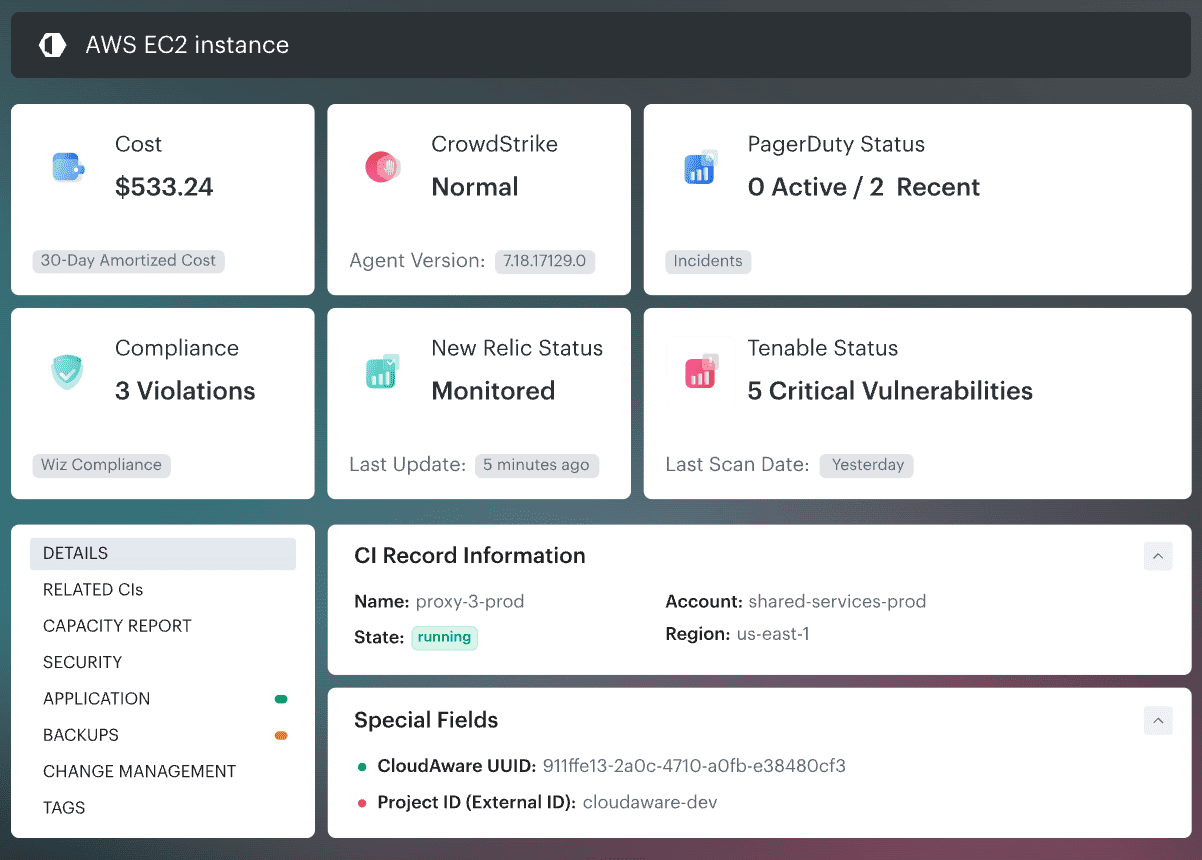
It covers: AWS, Azure, GCP, Kubernetes, VMware, Oracle, Alibaba, SaaS, and on-prem assets. The useful part is the CMDB layer. A vulnerable EC2 instance becomes “payment API, prod, owned by Platform Ops, linked to PCI scope, and Jira overdue.”
NeoSec: adaptive protection from dynamic attacks
Attackers now use AI to find new paths, brute-force at machine speed, and change tactics mid-attack. Static rules and CVE scans can't keep pace with every change in workload behavior.
NeoSec learns normal behavior for monitored assets, flags deviations, and sends an AI agent to investigate. The agent builds the timeline, tests what actually worked, separates observed evidence from inference, and adds owner, exposure, and blast radius from the CMDB. Actions your policy already approves can run automatically, while consequential steps go to your team for sign-off.
Features cloud security experts use
- NeoSec threat detection: Per-asset behavior baselines plus detection rules, file integrity with exact diffs, malware detection, cloud logs, and MITRE ATT&CK mapping, with an AI agent that investigates and drives policy-approved response
- Unified CMDB: Across AWS, Azure, GCP, Oracle, Alibaba, VMware, Kubernetes, and on-prem, with 3,000+ supported cloud services and CI types
- CMDB-aware CSPM: Declarative YAML/DSL policies; UCF mapping to 900+ authority documents
- Risk-based vulnerability management: Integrating Tenable, Qualys, Wiz, Nessus, CrowdStrike, and AWS Inspector
- IT compliance-as-code: Rule findings as first-class objects with owner, SLA, evidence, and lifecycle
- SIEM (Conflux): CMDB-enriched events, Tines-based automated response, and hot/cold storage tiering
- Intrusion Detection: File integrity and log inspection for HIPAA §164.312, PCI, and SOC 2 control evidence
- MCP server: Claude, ChatGPT, and other compatible MCP clients query the CMDB read-only to identify instances without scanner coverage, stale vulnerability results, or storage encryption gaps. The server reads the CMDB's BigQuery export, has no write tools, makes no direct calls into cloud accounts, and uses the signed-in user's access permissions
- Open integration: 63 native integrations across cloud, observability, and ITSM stacks
Pricing
Cloudaware pricing begins with the CMDB, because every module needs asset data underneath it. The base layer is priced around the configuration items you manage: servers, databases, disks, services, cloud accounts, owners, tags, and relationships. The public calculator starts at 50 servers, with Core from $67/month and Enterprise from $200/month.
A practical example:
| Environment | Core | Enterprise | CI capacity |
|---|---|---|---|
| 50 servers | $67/month | $200/month | 25,000 |
| 100 servers | $133/month | $400/month | 50,000 |
Additional CSPM, Vulnerability Management, and IT Compliance module prices are not published separately. Request a quote for the modules your security workflow requires. Threat detection is priced separately: NeoSec starts at $6.70 per asset per month, with no separate per-endpoint sensor license. The agent and its tuning are included.
The price grows in two ways. First, your environment gets bigger: more servers, assets, accounts, tickets, frameworks, and CIs. Second, you add modules on top of the CMDB base. That matters for buyers comparing cloud security management tools because the question changes from “what does the license cost?” to “which parts of our security workflow need asset context badly enough to pay for the module?”
There's also a 30-day free trial, no credit card required.
Now the sharper question: when users actually run Cloudaware, where does it feel strong, and where does it create friction?
Pros and cons
✅ Threat detection + compliance via CMDB: "Cloudaware has been a game-changer for securing our cloud infrastructure. The CMDB platform gives us complete visibility and control, allowing us to quickly detect and respond to threats while ensuring our cloud environment remains compliant." — Linda Cureton, CIO, NASA (Cloudaware case study)
✅ CSPM misconfiguration + unauthorized-access risk detection: "Cloudaware helps organizations identify potential security risks, such as misconfigured resources, unauthorized access, and data breaches, and provides recommendations to mitigate these risks." — Pourya M., Senior Consultant (G2)
✅ Compliance auditing + access controls + automated reports: "CloudAware helps me ensure that my cloud workloads comply with relevant regulations and industry standards. It provides features for auditing configurations, managing access controls, and generating compliance reports, which can be crucial for industries with strict regulatory requirements". — Verified User, Computer Software, Mid-Market (G2)
⚠️ Bundled Wazuh/Kibana SIEM frontend has a learning curve: "The software comes with Wazuh as the IDS, and the front-end is Kibana-based. It definitely takes some learning and getting used to using Kibana." — Pedro K., Information Security Officer (Capterra)
Cloudaware update: NeoSec now puts an AI investigator on top of the raw events, so analysts start from an investigation report with conclusions linked back to their supporting evidence.
⚠️ Hard to wire into existing security stacks: "Integrating Cloudaware with existing systems or workflows was challenging for me, especially when I have complex IT environments." — Verified User, Computer Software, Mid-Market (G2)
⚠️ Compliance tools hard to locate in the UI: "The navigation can feel overwhelming and counter-intuitive for non-IT professionals, often requiring significant time to locate specific survey sections or compliance tools." — Anonymous Architectural Specialist (Capterra)
2. Wiz — Best for agentless CNAPP at enterprise scale
G2: 4.7 / 5 (937 reviews)
Capterra: 4.7 / 5 (3 reviews)
Best fit: CNAPP teams that need attack-path context across cloud, identity, workload, and data risk.
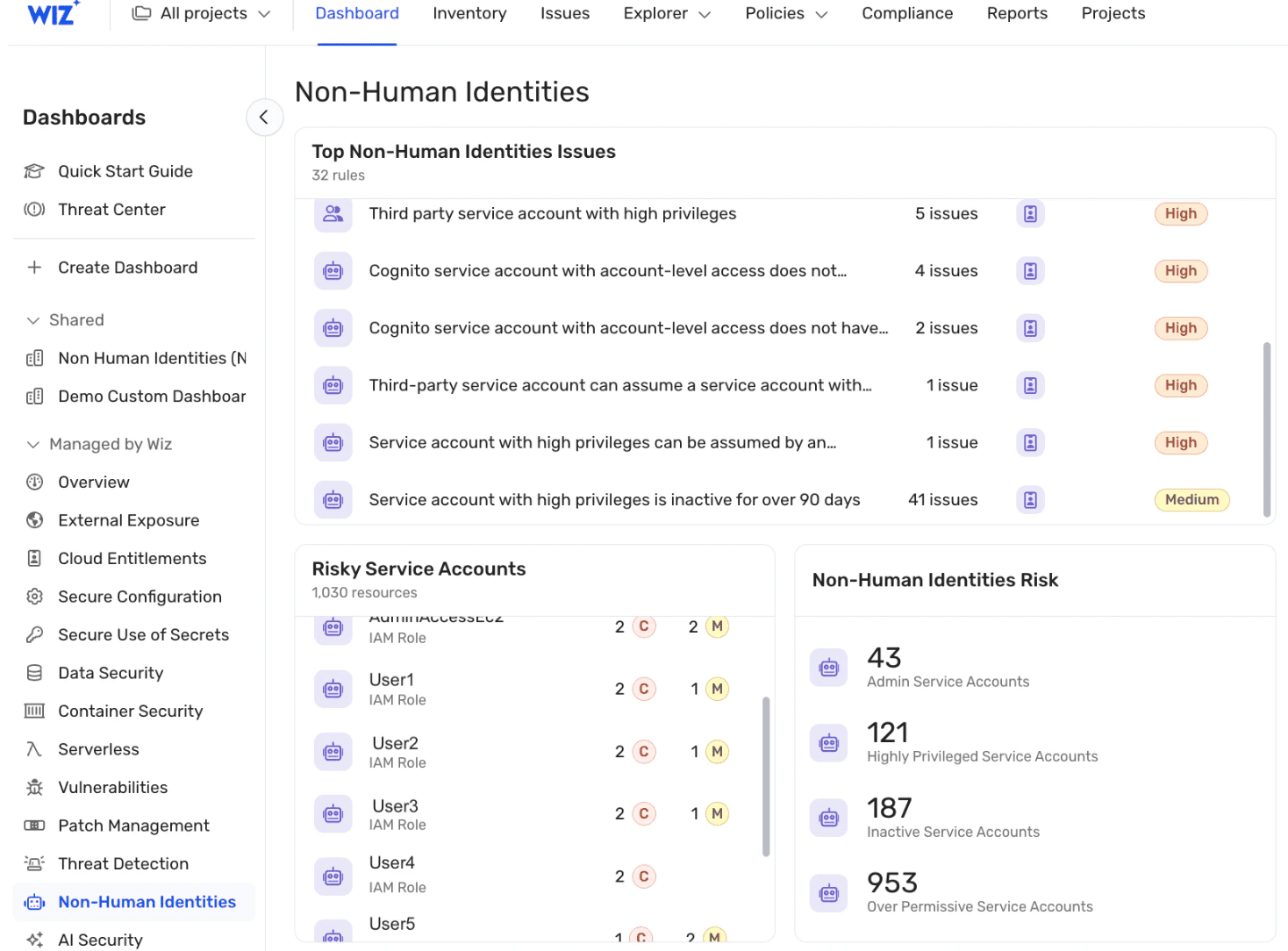
Wiz gives security teams a fast way to see which cloud risks can actually turn into exposure. Public VM with a critical CVE? Useful, but not enough. Wiz adds context: reachable from the internet, tied to an overprivileged identity, connected to sensitive data, running in production.
That Security Graph is the reason it keeps showing up in enterprise shortlists for cloud security tools.
Used by: Morgan Stanley, Siemens, BMW, Salesforce, LVMH
Covers: AWS, Azure, GCP, OCI, Alibaba Cloud, VMware, Kubernetes, SaaS, CI/CD
Buyer context: Google completed its acquisition of Wiz on March 11, 2026. Wiz retained its brand and continues to support the major cloud providers. Verify roadmap, procurement, and data-residency implications during the deal cycle; the acquisition does not make Wiz a GCP-only product.
Features
- Agentless full-stack scanning via cloud APIs across AWS, Azure, GCP, OCI, and Alibaba
- Security Graph correlates misconfigurations, vulnerabilities, identities, and data into attack-path narratives
- CIEM with effective-permissions analysis (the “who can actually do what” view)
- DSPM with sensitive-data discovery across cloud storage and databases
- Container and Kubernetes security: image scanning, registry scanning, and Kubernetes misconfiguration detection
- Wiz Code (IaC scanning, GitHub/GitLab integration), Wiz Runtime Sensor (optional agent)
- Native integrations with Slack, Jira, ServiceNow, PagerDuty, plus extensive cloud-vendor partnerships
Pricing
Wiz uses modular, quote-based pricing. Public pricing is thin, so buyer-reported purchase data provides a reference point.
According to Vendr buyer data, checked November 25, 2026:
- Reported annual purchase range: $30,617–$536,300
- Median annual purchase: $159,143
- Sample: 192 purchases
- Average reported savings: 22%
- Trial: No public self-serve trial listed
These figures reflect historical buyer transactions, not a published Wiz price list. Contract scope, workload volume, and included modules can differ substantially between purchases. The bill moves with workloads, active developers, log ingestion, sensors, and modules. Count cloud accounts, containers, repos, runtime coverage, and logs before the first call.
Pros and cons
✅ Agentless attack-path graph: "Agentless, quick to set up, no headaches. Best part: it doesn't drown you in alerts—it shows real attack paths, so you know what to fix first." (G2)
✅ Toxic combinations prioritization: "Wiz eliminates the noise by mapping our entire multi-cloud environment onto a single Security Graph. Instead of chasing thousands of minor alerts, it surfaces 'toxic combinations' — the exact intersection of a vulnerability, public internet exposure, and an over-privileged role." (G2)
✅ Fast multi-cloud connection: "The agentless, API-driven architecture connects AWS, Azure, and GCP tenants in minutes without impacting production. It also integrates smoothly into CI/CD pipelines and IaC (Terraform) to catch secrets and misconfigurations pre-deployment." (G2)
⚠️ Phantom container CVEs: "The platform frequently flags vulnerabilities in libraries that are technically present inside a container or file system, but are completely untouched, unimported, and unused by the running application… developers end up wasting time investigating and 'fixing' vulnerabilities that pose zero actual runtime risk to the active application." (G2)
⚠️ Opaque licensing for Wiz Code: "Licensing for WIZ Cloud and WIZ Code is the weak spot — it's rigid and not transparent enough, and figuring out what you actually need (and what it'll cost) takes more effort than it should. You also can't assign owners for fixing vulnerabilities, which makes remediation harder to track." (G2)
⚠️ API 10k-event result cap: "The API has limitations, like I cannot pull more than 10,000 events which in some cases becomes tedious. If I have an aggressive GraphQL query, the event count becomes too high, so pulling out that data using APIs does not help when the count is above 10,000 events." (G2)
Read also: Cloud Security Strategy: Roadmap, Pillars & Metrics
3. Palo Alto Networks Cortex Cloud (formerly Prisma Cloud) for code-to-cloud security
PeerSpot: 4.3 / 5 (11 reviews)
G2: 4.1 / 5 (138 reviews; includes historical Prisma Cloud reviews)
Best fit: Enterprise teams that want application security, cloud posture, runtime protection, and SecOps in the same Palo Alto operating model.
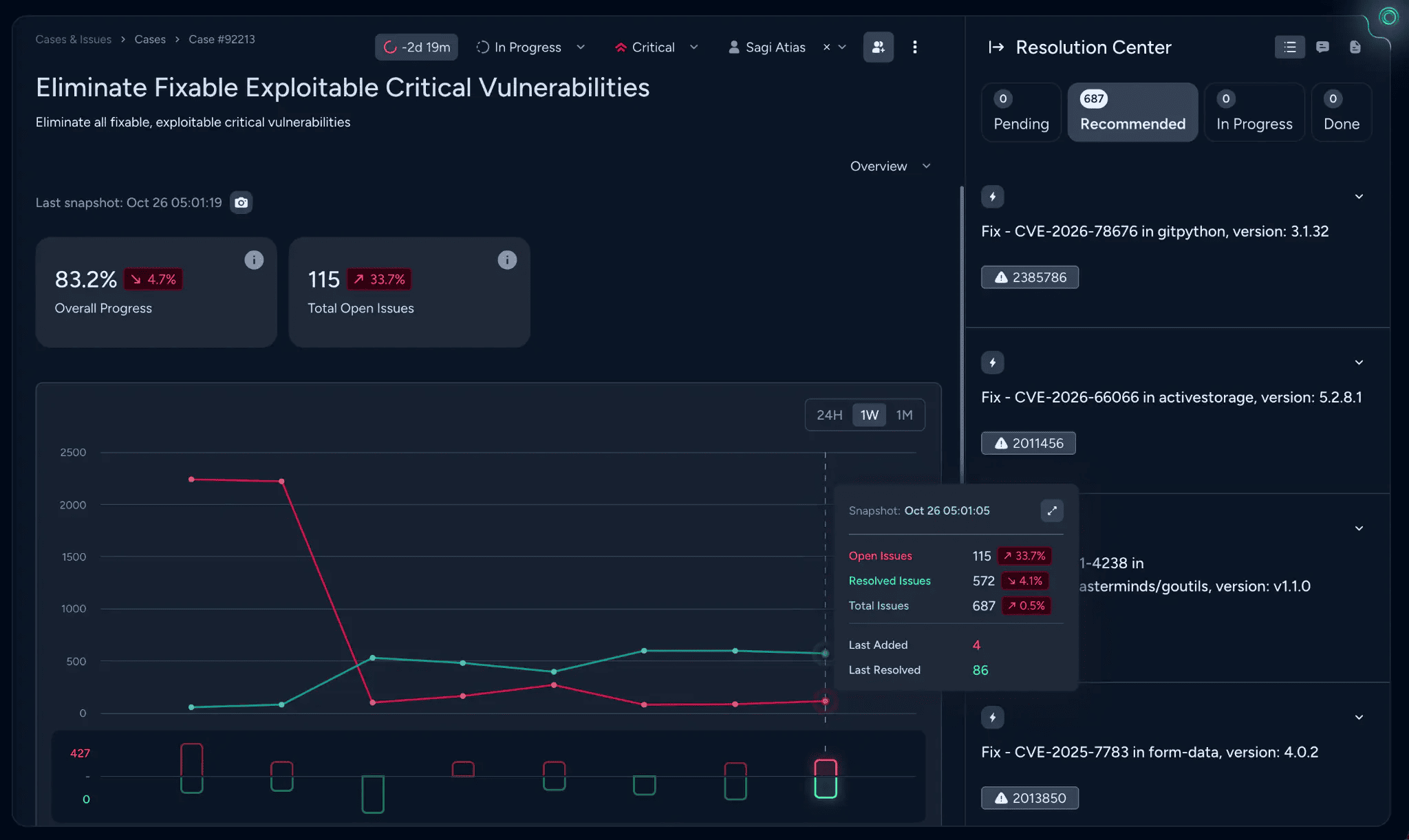
Palo Alto Networks introduced Cortex Cloud in February 2025 as the next version of Prisma Cloud, merging its CNAPP with cloud detection and response on the Cortex platform.
Existing Prisma Cloud customers upgrade through an Upgrade Helper that copies configurations into a new Cortex Cloud tenant while both tenants run in parallel. The November 2026 release, Cortex Cloud 2.3, expands runtime protection, SaaS security, AI agent inventory, and MCP capabilities for AI coding workflows.
The platform makes sense when security needs to trace risk across the full path: IaC misconfiguration, vulnerable image, exposed workload, over-permissive identity, and runtime alert, with the SOC working the same case.
Check before buying: Whether your tenant is still on Prisma Cloud, how posture and runtime workloads are counted, whether you need the per-developer Application Security add-on, and whether teams can absorb Palo Alto-level platform complexity.
Features
- Cloud Posture Management: CSPM, CIEM, ASPM, DSPM, AI-SPM, KSPM, cloud attack surface management, CI/CD posture, and agentless workload scanning
- Graph-based attack-path detection: Connects identities, code, data, workloads, and cloud resources
- Cloud Runtime Security: CDR, workload protection, and Web Application and API Security (WAAS), with the Cortex XDR agent and the eBPF-based Cortex Cloud Sensor for Linux and Kubernetes
- Application Security add-on: IaC, SCA, secrets scanning, open-source reachability analysis, artifact attestation, and ingestion of SAST/SCA findings from GitHub Advanced Security
- AI security: Inventory and risk context for agents, datasets, identities, and infrastructure in supported AI environments, including AWS Bedrock AgentCore and SageMaker, with MCP server discovery
- Cortex Cloud MCP Server: Security context and code scanning inside compatible AI coding environments, including Claude Code and Cursor
- SaaS Security: Posture, identity, data, and AI security coverage for supported SaaS applications
- Cortex XSIAM integration: Cloud findings, runtime alerts, and SOC cases share a data model and response workflows, subject to licensed scope
Pricing
Cortex Cloud is sold as an annual subscription metered by protected workloads. According to Palo Alto's licensing documentation, workloads are counted using a 90-day average. Posture and runtime workloads are licensed separately, while the Application Security add-on is priced per developer.
Workload licensing does not necessarily mean one cloud resource equals one billable unit.
| Resource type | Quantity equivalent to one workload |
|---|---|
| Virtual machines | 1 |
| Managed containers | 10 |
| Cloud buckets | 10 |
| PaaS databases | 2 |
| SaaS users | 10 |
Quota excess triggers a notification and does not generally switch protection off. When both licenses are present, excess posture workloads can spill into the runtime quota. Data ingestion, retention, and query compute units introduce additional costs.
The vendor site publishes no public list price. For a reference point, a UK G-Cloud 15 reseller pricing document, dated January 2026, lists:
- Cloud Posture Security: $200/workload/year
- Cloud Runtime Security: $400/workload/year
- Application Security: $500/developer/year
These are reseller reference prices before discounts, not a direct quote from Palo Alto Networks. No self-serve trial is listed; access starts with a demo request. Before the first call, count VMs, container hosts, serverless functions, and contributing developers, then ask how each converts into billable units.
Pros and cons
The following reviews refer to Cortex Cloud rather than relying on older reviews of Prisma Cloud.
✅ Real-time runtime defense: "Cortex Cloud by Palo Alto Networks' cloud runtime security in terms of stopping attacks in real time is impressive." — Sonali Jha, Technical Solutions Architect, IBM, March 2026 (PeerSpot)
✅ Faster detection and response: "I have absolutely seen improvements in our incident close rates, with mean time to detect and respond reduced significantly, sometimes by at least forty to fifty percent." — Tejas Jain, Principal Cloud Architect, January 2026 (PeerSpot)
✅ Ease of use and migration: "I have seen several benefits from using Cortex Cloud by Palo Alto Networks: It was easy to use and easy to migrate from the IBM platform." — Oscar Ojeda, Owner, Xelere, December 2025 (PeerSpot)
⚠️ Consolidation made the UI heavier: "It used to be a very user-friendly tool, but now they have incorporated everything under one umbrella." — Sonali Jha, IBM, March 2026 (PeerSpot)
⚠️ Price makes ROI hard to justify: "The pricing is high, making ROI challenging to justify, especially during transitions between solutions." — Tejas Jain, January 2026 (PeerSpot)
⚠️ Rename confusion: "Cortex Cloud by Palo Alto Networks is creating some confusion in terms of names because this is recent." — Nuno Santos, Cybersecurity Analyst, November 2025 (PeerSpot)
Read also: Cloud Security Policy: Components, Template & Management Guide
4. CrowdStrike Falcon Cloud Security — Best for EDR-led cloud workload protection with strong CWPP
G2: 4.5 / 5 (254 reviews)
Best fit: SOC-led teams that need cloud runtime defense, not posture-only scanning.
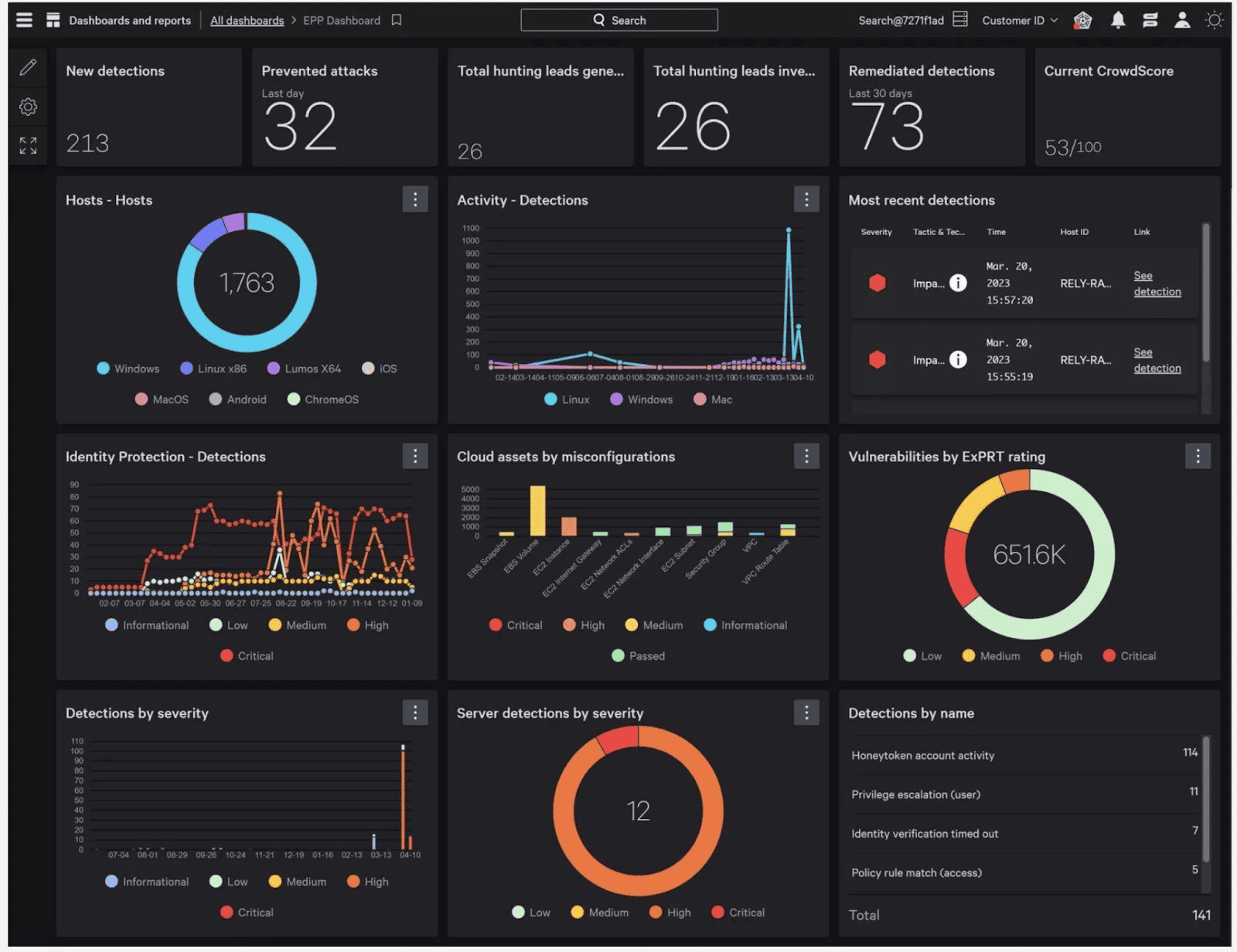
Falcon Cloud Security combines agentless discovery with Falcon sensor data, so findings can be checked against live workload behavior, identity activity, container signals, and threat intel. Vodafone Oman uses it for containerized workload protection. Monvia points to Kubernetes visibility and automated alert handling. Avalon runs it across cloud services at a 100M+ member scale.
For buyers comparing cloud security tools, verify three things before the PoC: sensor coverage, SIEM handoff, and how well cloud findings map to existing CMDB or ITSM ownership.
Features
- Falcon Cloud Workload Protection: lightweight agent and Falcon Sensor for containers and Kubernetes
- CSPM with multi-cloud coverage across AWS, Azure, GCP
- Threat detection with Indicators of Attack (IOA) backed by CrowdStrike's threat graph
- Image scanning, runtime detection, and container drift detection
- Identity Protection module for cloud and Active Directory identity threats
- Falcon Managed XDR option for managed detection and response
- Integration with Falcon endpoint platform for unified workload and endpoint detection
Pricing
Falcon Cloud Security is quote-based. CrowdStrike publishes pricing and trial options for its Falcon endpoint products, but those figures should not be treated as Cloud Security subscription prices.
A 15-day Falcon trial is advertised. Confirm whether the cloud security capabilities and sensors you want to evaluate are included.
Budget grows with devices, sensors, cloud workloads, modules, MDR, identity protection, and SIEM data. For teams comparing cloud computing security tools, the real model is coverage depth: endpoint estate first, cloud runtime second.
Pros and cons
✅ Agentless + agent-based combo: "I LOVE the fact that you can get agentless visibility with agent-based protection. That's an absolute game changer. Being able to get visibility into something before we get an agent on it is insanely cool — the three pillars of CNAPP being CSPM, CWP, and CDR." (G2)
✅ Strong runtime/container security: "Threat intelligence integration is solid, and the runtime and container security are strong." (G2)
✅ Easy AWS plug-in, low overhead: "I like how easily it plugs into our AWS environment and gives us real-time visibility into what's happening across our cloud workloads. The threat detection is strong — it quickly flags unusual behavior or misconfigurations without a lot of noise. I also appreciate how lightweight it is; it doesn't slow anything down." (G2)
⚠️ Requires the full CrowdStrike stack: "To get the best results and achieve a strong security posture for your cloud assets, it's necessary to have a complete CrowdStrike environment. This helps ensure full visibility and provides all the telemetry needed to deliver a solid response to the different threats you may face in a cloud platform environment." (G2)
⚠️ Opaque pricing for partners: "They do not provide partners with price lists, and to sell new functionalities or products, the prerequisites to be considered are not clear (a lot of complexity). I think it is because they are new alliances or acquisitions." (G2)
⚠️ Noisy low-risk findings: "I've noticed that some of the findings can feel a bit noisy at times, especially when it flags low-risk configuration issues that don't always need immediate attention. The pricing can also be on the higher side as you scale." (G2)
5. Microsoft Defender for Cloud for Azure-first multi-cloud organizations wanting deep native integration
G2: 4.4 / 5 (463 reviews)
Capterra: 4.0 / 5 (5 reviews)
Best fit: Microsoft-heavy teams that want CNAPP, posture, workload protection, and compliance inside the same security stack.
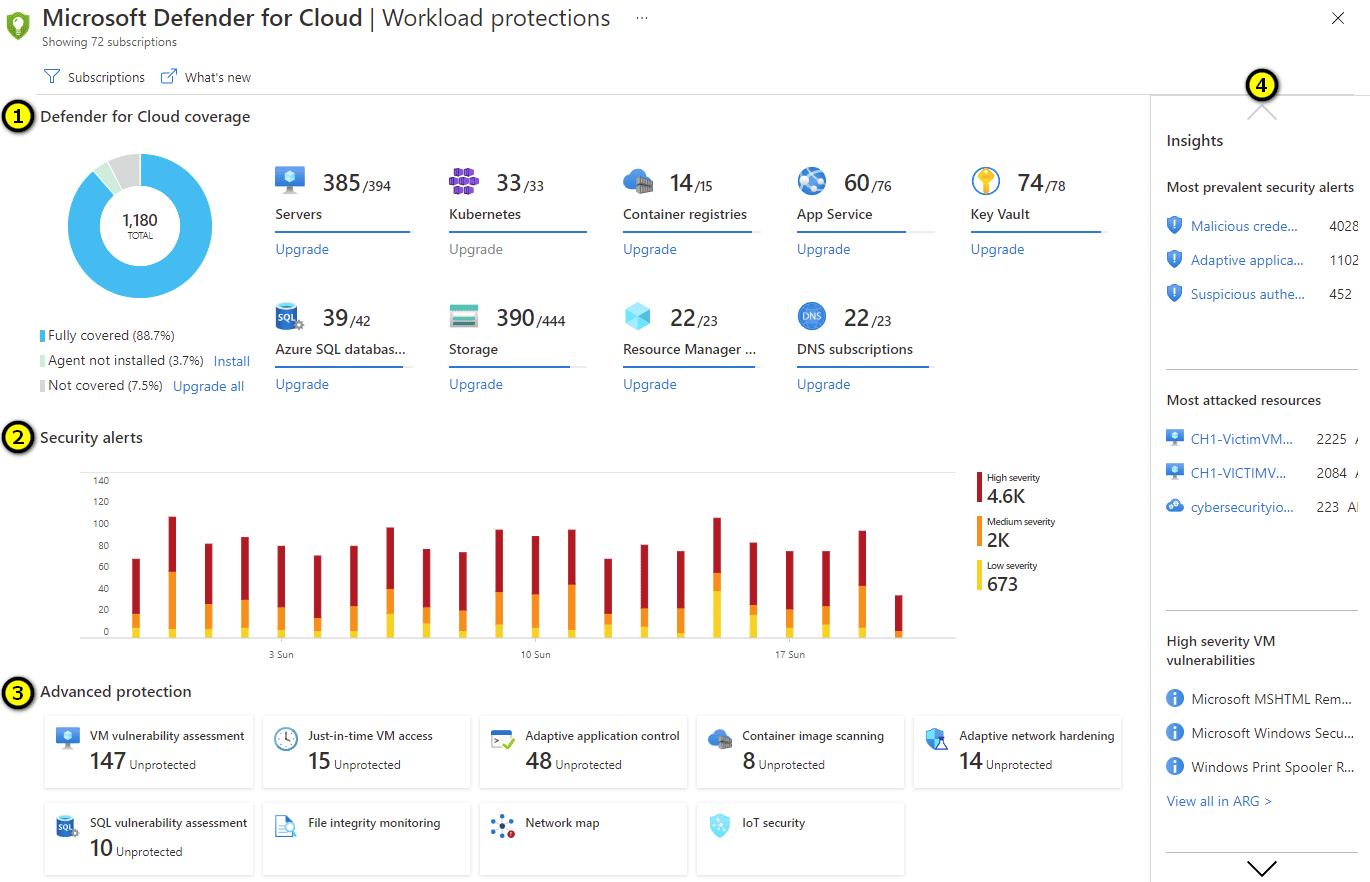
Defender for Cloud is practical when Azure is the center of gravity, but AWS, GCP, Kubernetes, and on-prem servers still need coverage. It handles CSPM, server protection, containers, storage, databases, APIs, DevOps findings, and attack paths. Among cloud-native security tools, its edge is Microsoft context: identity, Defender XDR, Sentinel, policies, and resource data already speak the same language.
Check in PoC: Owner mapping and CMDB sync.
Features
- CSPM with Azure-native, AWS, and GCP coverage
- Cloud Workload Protection: VM, container, serverless, App Service, SQL, storage
- Defender for Containers: image scanning, Kubernetes-native protection, admission control
- DevOps security: GitHub and Azure DevOps repository security
- Native integration with Microsoft Sentinel (SIEM) and Entra (identity)
- Secure Score: posture scoring across the organization
- Paid Defender CSPM plan with attack-path analysis and advanced posture capabilities
Pricing
Defender for Cloud pricing depends on what you protect.
- Free: Foundational CSPM
- Trial: 30 days for eligible paid plans
- Paid meters: Servers, databases, storage, containers, APIs, serverless, subscriptions, and vulnerability scans
Microsoft documents the differences between Foundational CSPM and paid Defender CSPM.
For buyers comparing cloud computing security tools, the first pricing task is inventory: count protected resources by type, not just cloud accounts. Among cloud-native security tools, Defender's advantage is Azure-native signal depth. The cost risk is meter sprawl: one platform, many billing lines, and multiple teams creating spend.
Pros and cons
✅ Secure Score "health bar": "Honestly, the best thing about it is the Secure Score. It's basically like a 'health bar' for your entire cloud setup. Instead of digging through endless logs to figure out what's wrong, it gives you a clear percentage and a prioritized 'to-do list' of how to fix things." (G2)
✅ Covers AWS and GCP workloads: "Microsoft Defender for Cloud is not just for the workloads or machines hosted in Azure, but also those hosted in AWS and Google Cloud too… it helps to understand the security posture of our cloud services, scanning current vulnerabilities and security gaps. One of the best parts of Defender for Cloud is it secures CI/CD pipelines too." (G2)
✅ Native Azure integration: "Microsoft Defender works best when you're using Azure and other native Microsoft products. Because of that, it's easy to pull all the logs, maintain security configurations, and monitor everything in real time." (G2)
⚠️ Stale remediation status: "One recurring issue I have faced is with the recommendation status update; even after a security recommendation is remediated, the dashboard continues to show it is pending. There is no way to validate the resolution status in real time. Fine-tuning the alert settings is a time-consuming process." (G2)
⚠️ Reported 7-minute lag in alerts: "It's always lagging. And there is a 7-minute delay with everything." (G2)
⚠️ Reported zero-day detection gaps: "Features are good but a few times they failed to detect the hidden pattern of malware. Zero-day attack is also not recognized by them most of the time. Their attack analysis did not give you more details a lot of time." (G2)
Read also: 12 Best Cloud Security Assessment Tools for 2026
6. Tenable Cloud Security — Best for vulnerability-led cloud security teams already running Tenable
G2: 4.5 / 5 (44 reviews)
Capterra: 5.0 / 5 (2 reviews; Ermetic listing)
Best for: Identity-first CIEM (ex-Ermetic) for finding excessive entitlements, toxic IAM combinations, and privilege-escalation paths across cloud accounts.
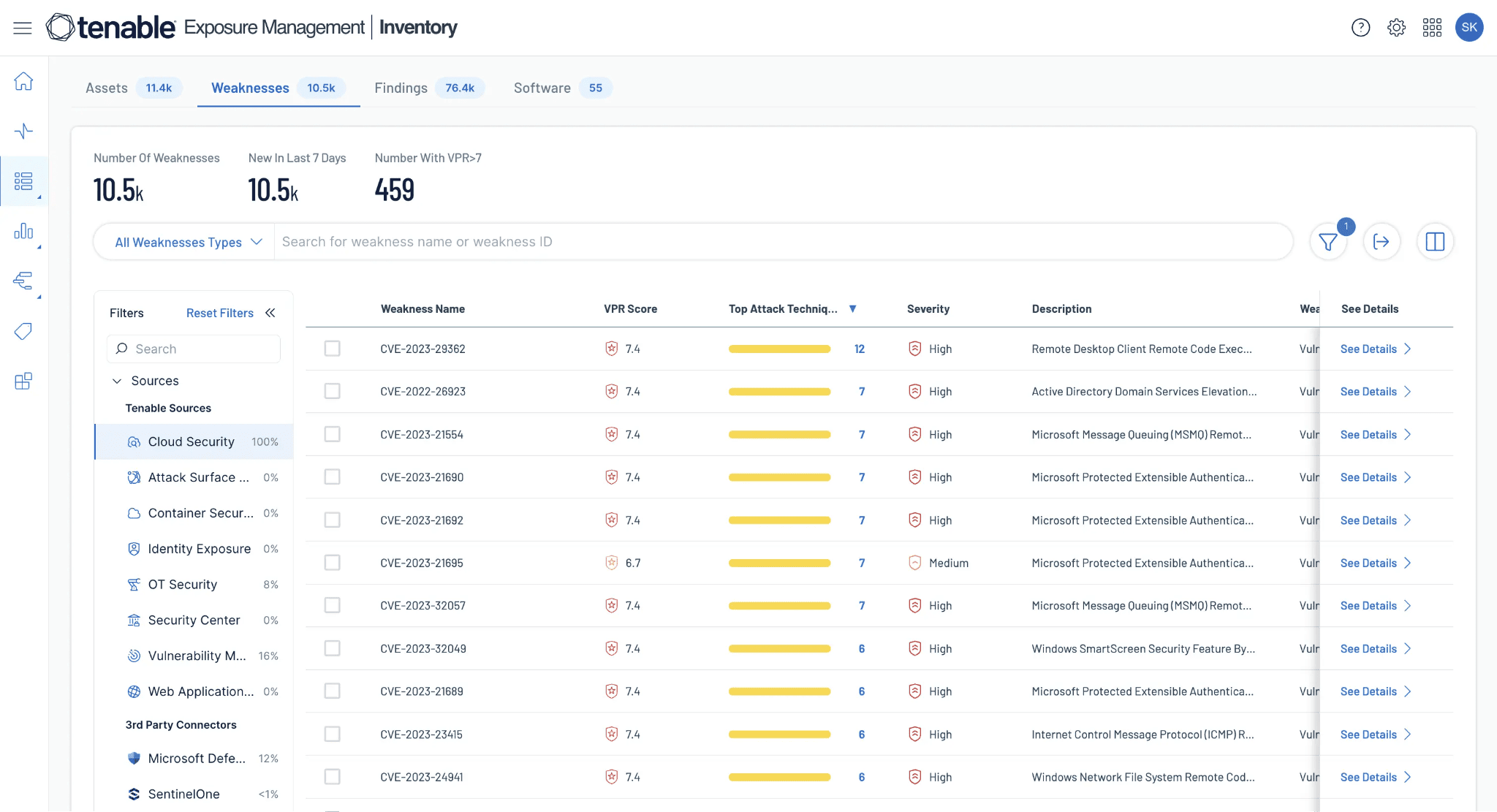
Tenable Cloud Security connects CSPM, CIEM, workload risk, DSPM, and attack-path analysis across AWS, Azure, Google Cloud, Alibaba Cloud, Kubernetes, and hybrid estates. AppsFlyer used it to catch excessive entitlements, public S3 exposure, internet-facing databases, and risky SaaS access. Continental AG uses Tenable One across IT, OT, cloud, and web apps.
Why shortlist it: Identity-risk context plus vulnerability and exposure data in one model.
Check before buying: CMDB sync, ticket routing, custom policy depth, and alert noise.
Features
- Agentless CSPM across AWS, Azure, GCP
- CIEM with effective-permissions analysis (Ermetic technology)
- Container security: image scanning, registry integration, Kubernetes posture
- IaC scanning for Terraform and CloudFormation
- Vulnerability data correlated from Tenable's vulnerability research team
- Unified Tenable One Exposure Management platform integration
- Strong reporting and dashboards inherited from enterprise vulnerability heritage
Pricing
Tenable Cloud Security is quote-priced, so the clean number is the meter: billable cloud resources. That means VMs, container hosts, Kubernetes, serverless, images, repos, data stores, and databases. Public trial length: not disclosed. Capterra lists a free trial.
Tenable's separate Vulnerability Management product has a different pricing model, so its asset-based public entry price should not be used as a Cloud Security quote.
Before the PoC, count resources by type.
Pros and cons
✅ Single multi-cloud dashboard: "If you have multi-cloud tenancy using AWS and Azure, you can have a single dashboard where you can onboard all the cloud infrastructure and have visibility into it." (PeerSpot)
✅ Strong vulnerability detection + SCA: "Tenable Cloud Security excels in vulnerability detection, one of its strongest features. Another valuable feature is software composition analysis, which highlights and automates the detection of security flaws." (PeerSpot)
✅ One-click Jira from findings (Ermetic): "Ermetic can provide super visibility for our cloud environment (we are using AWS). The dashboard is simple to use, the findings provide all of the information you require, it provides detection and remediation, and creating a Jira ticket from a finding is just one click away." (PeerSpot)
⚠️ Stability issues: "In my experience, Tenable Cloud Security is not very stable." (PeerSpot)
⚠️ Lacks patch management: "Tenable needs to offer a patch-based solution since it is an area where the tool lacks a bit." (PeerSpot)
⚠️ Slow ad-hoc operations: "If I need to run a script on only those aforementioned ten servers and generate a report, it will be highly time-consuming with Tenable Cloud Security. Even if I need a single ad-hoc command, the solution processes a whole script for all Linux servers, which takes massive time." (PeerSpot)
7. Sysdig Secure for container and Kubernetes runtime security at scale
G2: 4.8 / 5 (111 reviews)
Capterra: 4.4 / 5 (7 reviews)
Best fit: Kubernetes-heavy teams that need runtime detection tied to posture and vulnerability risk.
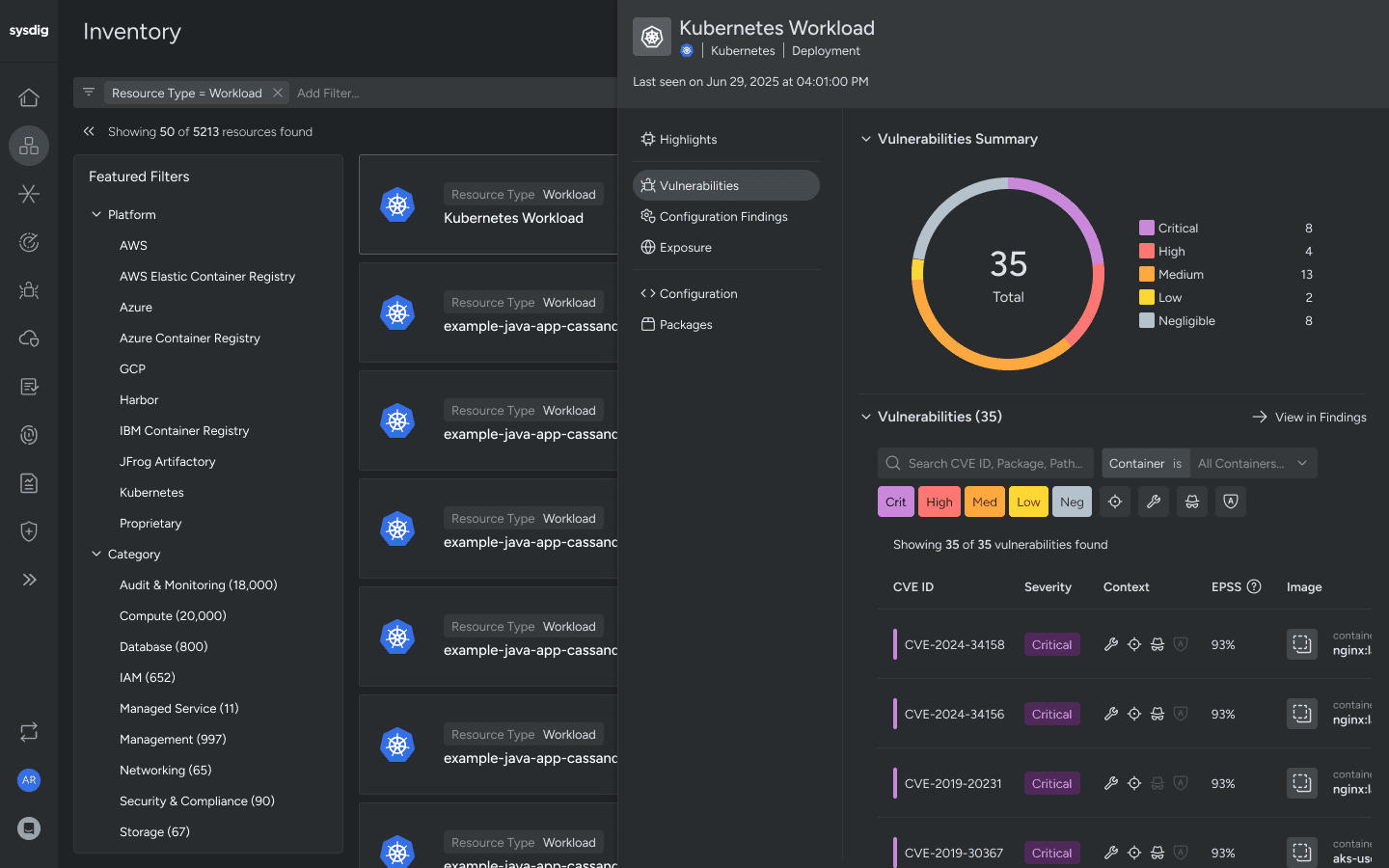
Sysdig Secure is strongest when containers move fast, and static scans age out quickly. BigCommerce uses it for real-time visibility and less noise. Sysdig's customer examples report that Neo4j cut false positives by 75% and vulnerabilities by 80%, while BitMEX investigates alerts in about 30 seconds. Coverage spans AWS, Azure, Google Cloud, on-prem, private, and bare metal.
Among multi-cloud security tools, its edge is runtime context. Check CMDB and ITSM handoff before buying.
Features
- Falco-based runtime threat detection, built on the open-source Kubernetes runtime security ecosystem
- Image scanning (CI/CD integration), admission control, registry scanning
- CSPM coverage across cloud providers and extensive Kubernetes coverage
- CIEM with cloud and Kubernetes identity entitlements
- Sysdig Live: real-time workload telemetry and incident response
- Cost optimization features alongside security (unusual in the category)
- Strong integration with CNCF ecosystem (OPA, Falco, Kubernetes APIs)
Pricing
Sysdig pricing is quote-based, so the buying work starts with meters.
- Public price: Not listed
- Trial length: Not disclosed
- Main meters: Hosts, CSPM compute instances, cloud-log events
Count Kubernetes nodes, Linux/Windows hosts, serverless footprint, cloud accounts, and log volume before the demo. Runtime-heavy teams should model event growth too. That is where “small pilot” pricing can drift once detections, logs, and more clusters come online.
Pros and cons
✅ Falco-powered runtime detection: "Sysdig sees the actual behavior inside the container or kernel and correlates it with Kubernetes infrastructure, which makes detection both earlier and more precise in a cloud-native environment." (PeerSpot)
✅ Reduces alert noise on Kubernetes: "Sysdig Secure has positively impacted our organization by improving visibility into our Kubernetes environment and focusing on real risk, which has reduced alert noise, improved threat detection at runtime, and made vulnerability management more efficient by prioritizing issues that actually affect running workloads." (PeerSpot)
✅ Offline registry image scanning: "Sysdig Secure's standout features include the capability to scan offline container images in container registries and detect vulnerabilities in running containers and libraries." (PeerSpot)
⚠️ Weak CSPM vs. CNAPP leaders: "The solution needs to improve overall from a CSPM standpoint since they can't compete with Wiz or Orca." (PeerSpot)
⚠️ Source code data-residency concerns: "If your source code is hosted within your own premises, say on Bitbucket, you naturally wouldn't want your code to be accessible to external parties beyond your company. Keeping your code base private is a standard practice." (PeerSpot)
⚠️ Bundled features can't be unbundled: "Currently, in Sysdig Secure, they bundle multiple features, and we are unable to use them individually. For instance, if we only need compliance scanning, we have to deploy the entire secure package." (PeerSpot)
Read also: Healthcare Data Breaches in 2026: Cases & Lessons
8. Orca Security for agentless, fast-deploy CNAPP for cloud-native organizations
G2: 4.7 / 5 (313 reviews)
Capterra: 4.8 / 5 (60 reviews)
Best fit: Teams that need fast cloud coverage without deploying agents everywhere.
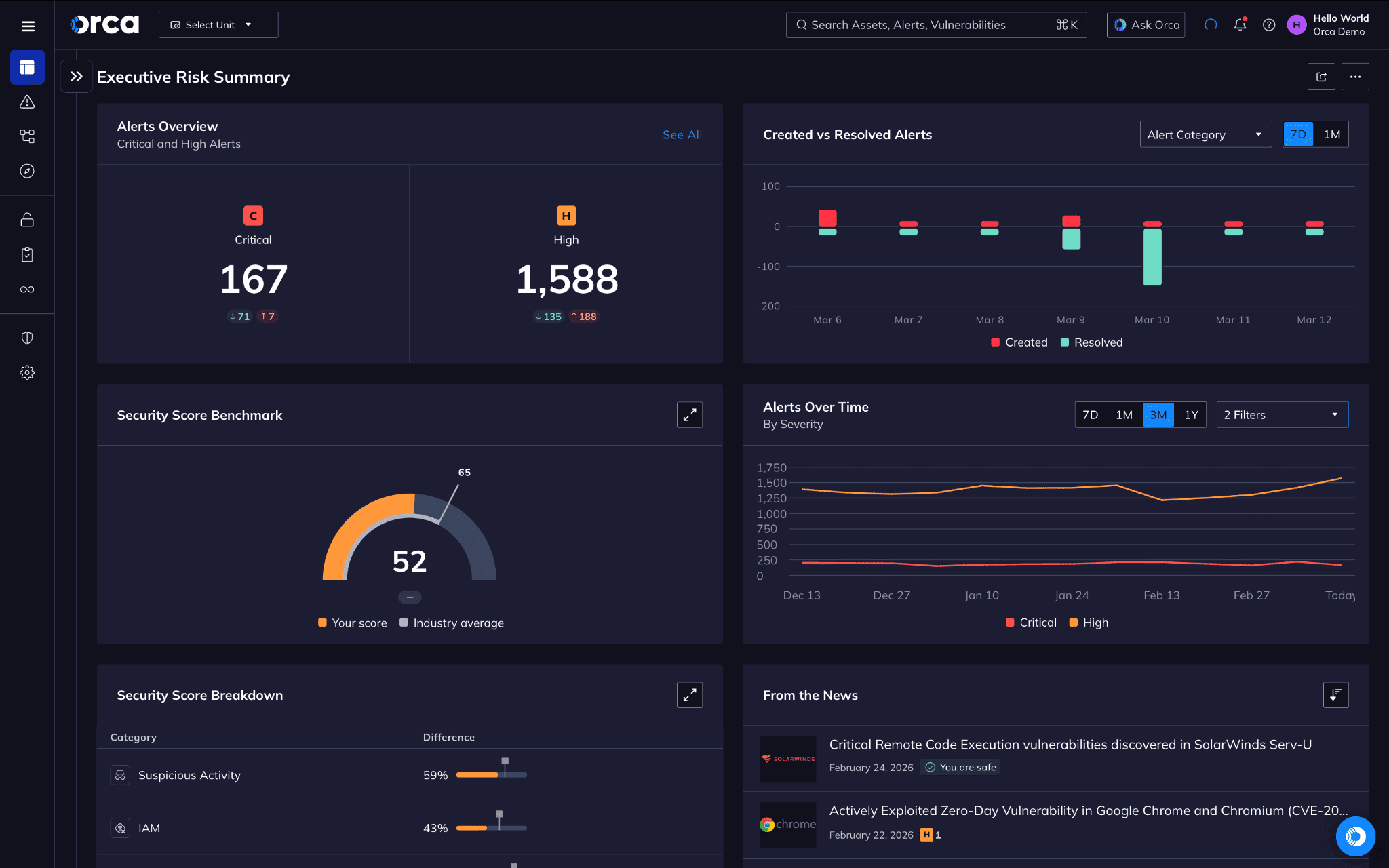
Orca scans cloud estates through SideScanning, then ranks risk with a unified data model: vulnerable workload, public exposure, identity path, sensitive data, and compliance scope in one view. Autodesk uses it for secure generative AI apps.
Swiggy scaled security across 10,000+ containers. Paidy reports saving two FTEs and $500,000/year. Coverage spans AWS, Azure, Google Cloud, Alibaba, Oracle, Tencent, Kubernetes, and hybrid runtime via Orca Sensor.
Check before buying: CMDB sync and ticket ownership.
Features
- SideScanning agentless model: scans cloud workloads via snapshots without runtime agents
- Unified CNAPP: CSPM, workload vulnerability assessment, CIEM, DSPM, malware detection
- Attack Path Analysis correlating misconfigurations, vulnerabilities, and identities
- Multi-cloud: AWS, Azure, GCP, Oracle Cloud, Alibaba
- Container and serverless coverage without per-workload agents for supported agentless assessments
- Strong DSPM features for sensitive-data discovery
- Public-source code review for risk attribution
Pricing
Orca gives pricing signals, not list prices.
- Public dollar price: Not disclosed
- Trial: Available, days not listed
- Model: Annual, based on average workloads scanned
G2 buyer data reports a 1-month implementation period, 7-month ROI, and a 16% average discount. These figures reflect buyer-reported experiences rather than guaranteed implementation or ROI outcomes.
Budget depends on workload count, cloud accounts, Kubernetes, data stores, APIs, compliance scope, and sensor coverage.
Pros and cons
✅ Agentless side-scanning, no CPU drag: "Installing traditional security agents on heavily utilized databases creates unacceptable CPU overhead. Orca connects directly to our Azure and AWS environments via API, which fits our setup well." (G2)
✅ Frictionless MSP onboarding: "Client onboarding has traditionally been the most painful part of our business, because clients often hesitate to let third-party agents run on their production servers. Orca Security's agentless side-scanning has completely eliminated this friction." (G2)
✅ Context-aware risk scoring cuts CVE noise: "The alerts are clear, actionable, and prioritized using real context rather than relying only on severity levels. As a result, we no longer waste time combing through huge CVE lists that don't actually apply to our environment." (G2)
⚠️ Initial scan floods dashboard: "Because Orca is so thorough, the initial baseline scan of a new client environment generates an overwhelming number of alerts. It ends up uncovering years of technical debt, forgotten staging servers, and dormant misconfigurations." (G2)
⚠️ Rigid RBAC for data segmentation: "Segmenting data visibility within the Orca dashboard feels a bit rigid. I want my taxonomy engineers to log in and see the security posture for only the specific retail database they manage; however, the role-based access control makes this difficult." (G2)
⚠️ Reporting customization limited: "Some of the more advanced reporting features could be easier to customize. Overall, the interface is solid, but there are a few sections that take a bit of time to fully understand and get comfortable with." (G2)
9. Snyk for developer-first cloud and code security
G2: 4.5 / 5 (136 reviews)
Capterra: 4.6 / 5 (21 reviews)
Best fit: AppSec and DevSecOps teams that want cloud risk fixed before deployment.
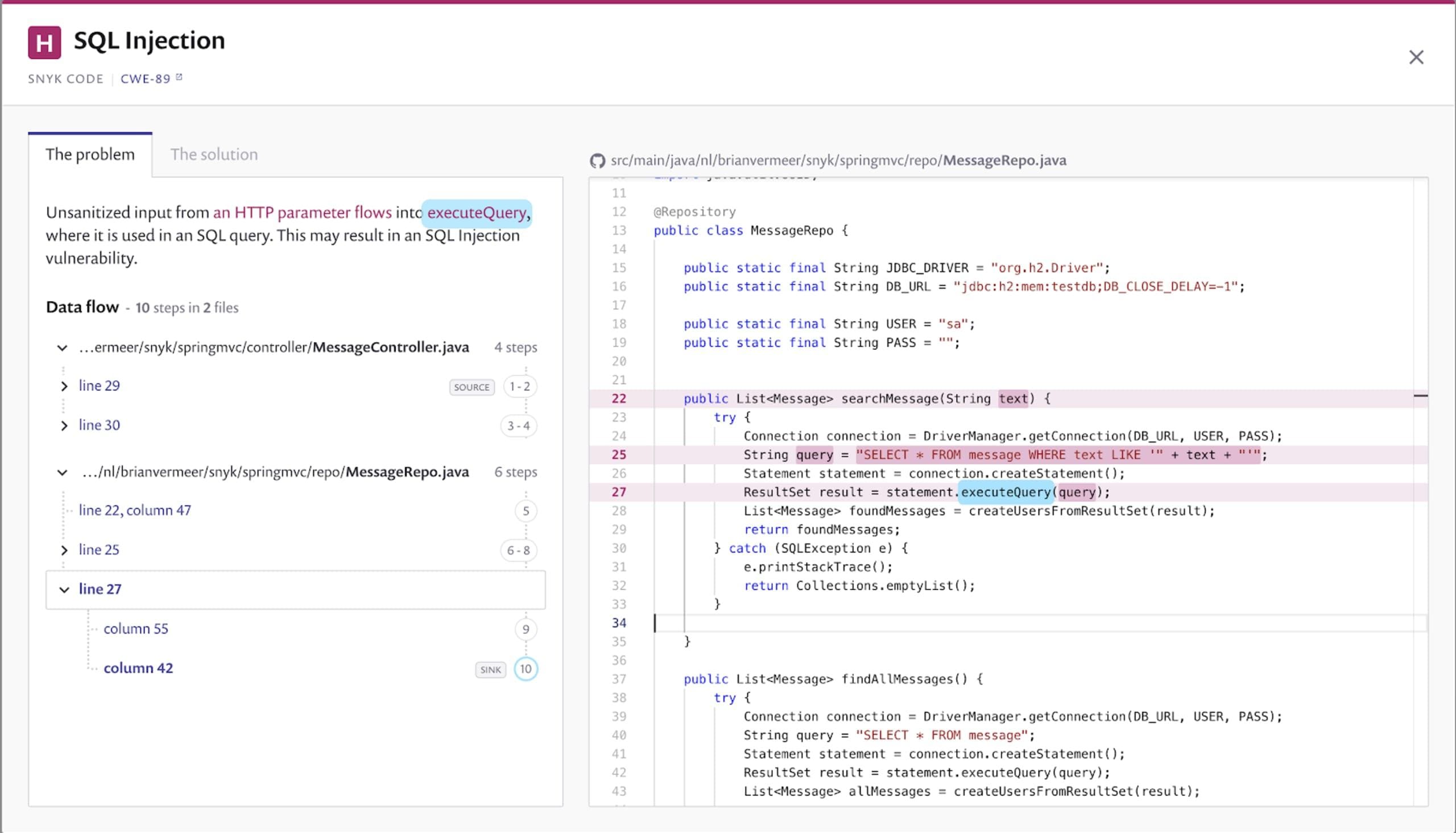
Snyk sits in the developer workflow: SAST, SCA, container scanning, IaC, secrets detection, and API and web application testing. Its Evo portfolio extends security coverage to AI-generated code and AI agents, with some agentic capabilities still in preview.
Spotify uses it in build pipelines. Snowflake uses it for developer-led security. Komatsu reported cutting mean time to fix vulnerabilities by 62% in three months.
Why shortlist it: Strong repo-level context: owner, package, image, IaC file, fix path.
Check before buying: Runtime coverage, cloud posture depth, Jira workflow, credit consumption per product, and noise from dependency alerts. Cloud scans of deployed configurations require the Enterprise plan.
Features
- Snyk Code: SAST in the IDE, CLI, and CI/CD, with AI-assisted fixes through Snyk Agent Fix
- Snyk Open Source: SCA for open-source dependency vulnerabilities
- Snyk Container: Image scanning with base-image upgrade advice
- Snyk IaC: Terraform, CloudFormation, Kubernetes, and Helm; cloud scans of deployed AWS, Azure, and Google Cloud configurations on the Enterprise plan
- Snyk Secrets and Snyk API & Web: Secrets detection and dynamic testing for web applications and APIs
- Snyk Studio: AI-assisted security guidance and conversational remediation within developer workflows
- Evo AI security: AI-SPM for AI models and agents, Agentic Development Security for coding agents, and Continuous Offensive Security for AI pentesting and agent red teaming
- Native integrations: GitHub, GitLab, Bitbucket, Azure DevOps, Jira, and JetBrains IDEs
Snyk's October 2026 Evo Agentic AppSec announcement introduced additional agentic capabilities with different availability levels. Buyers should distinguish generally available Enterprise products from preview features.
The Evo Remediation Agent is in open preview. The Code Scanning Agent, Dependency Firewall, and Agentic Security Review are in experimental preview for selected customers.
Pricing
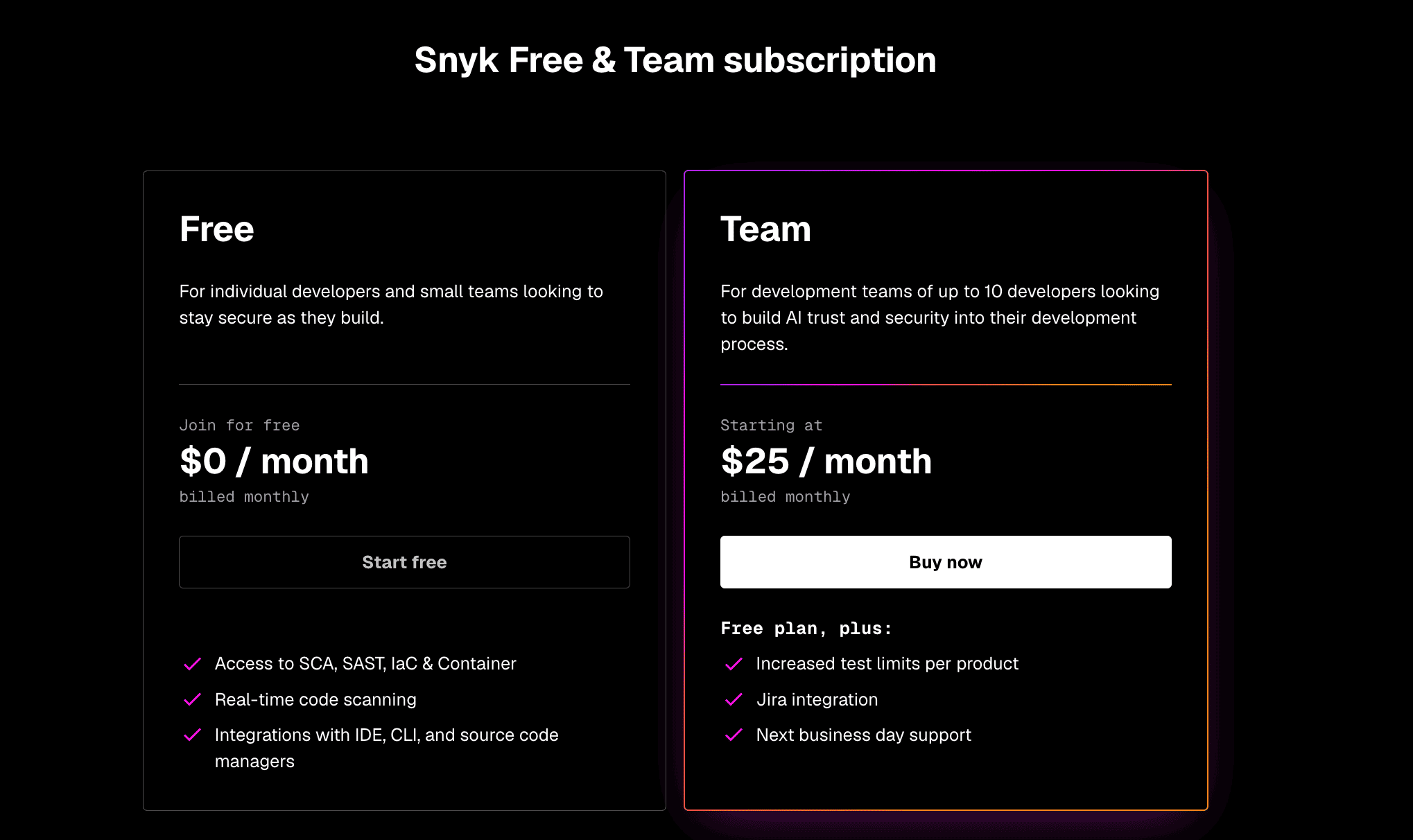
Snyk prices Free and Team by projects, tests, and team size, and Enterprise by prepaid credits.
According to its plans page and Team subscription details:
- Free: $0; five projects; test limits of 100 Snyk Code, 200 Open Source, 300 IaC, and 100 Container tests
- Team: $25 per contributing developer per month, minimum five and maximum 10 developers; from $125/month, or $1,375 annually at the five-developer minimum
- Enterprise (Platform Subscription): Quote-based prepaid credits, with one credit equivalent to $1
- Trial: No separate Team trial listed; the Free tier is the self-serve evaluation path, while Enterprise starts with a demo
The Enterprise credit model uses different billing units for different security capabilities.
| Capability | Billing unit | Credits |
|---|---|---|
| Snyk Code | Active contributor per day | 1.0 |
| Snyk Open Source | Active contributor per day | 1.0 |
| Snyk Secrets | Active contributor per day | 0.66 |
| Evo AI-SPM | Active contributor per day | 0.66 |
| Snyk IaC | Active contributor per day | 0.33 |
| Snyk Container | Monitored image per day | 0.33 |
| API & Web (DAST) | Provisioned target per day | 3.0 |
| Evo Agentic Development Security | Active machine per day | 1.0 |
| Evo Continuous Offensive Security | Assessment | 4,000 |
Unused credits expire at the end of the order term, and usage above the prepaid pool is invoiced in arrears. Evo capabilities require Enterprise.
Before the call, count active contributors per product, monitored images, DAST targets, and planned AI pentests. Size the credit pool from representative pilot usage rather than developer seat counts alone.
Pros and cons
✅ Auto-fix PRs for new CVEs: "Offers real-time alerts as new CVEs are published. Suggests automated fix PRs with updated, secure versions. Scans project dependencies (npm, Maven, pip, etc.) for known vulnerabilities." (TrustRadius)
✅ IDE plugin shifts left effectively: "The Snyk Code IDE plugin is something that really works very well and brings out the true shift-left story by providing very accurate findings and equally good mitigation solutions to the developers." (TrustRadius)
✅ Broad IaC + container coverage: "Helps in dependency management, SAST — Static Application Security Testing, Infra Code Scan (Terraform, CloudFormation, Docker image scan), OSS." (TrustRadius)
⚠️ Reported limitations in custom policies: "Snyk doesn't allow users to define custom security policies or scanning rules, especially in SAST and IaC modules." (TrustRadius)
⚠️ Enterprise pricing prohibitive at scale: "While Snyk offers a generous free tier, enterprise pricing can be cost-prohibitive for larger teams or startups scanning many repositories or containers." (TrustRadius)
⚠️ False positives in mixed-language code: "Setting up is complex, and when not done properly, it provides too many false positives. We use another tool in parallel because it does not cover all of our languages, especially for older code that is in mixed languages." (TrustRadius)
These reviews predate parts of Snyk's 2026 Evo portfolio and credit-based Enterprise packaging. Use them as evaluation questions, and test the current product during a pilot.
Read also: Cloud Security Vulnerabilities - A 2026 Practitioner Guide to Detection, Prioritization, and Remediation
10. Prowler for free, open-source cloud security assessment
PeerSpot: 4.3 / 5 (6 reviews)
Best fit: Teams that want open CSPM and compliance checks they can inspect, extend, and run through CLI, API, UI, or managed cloud.
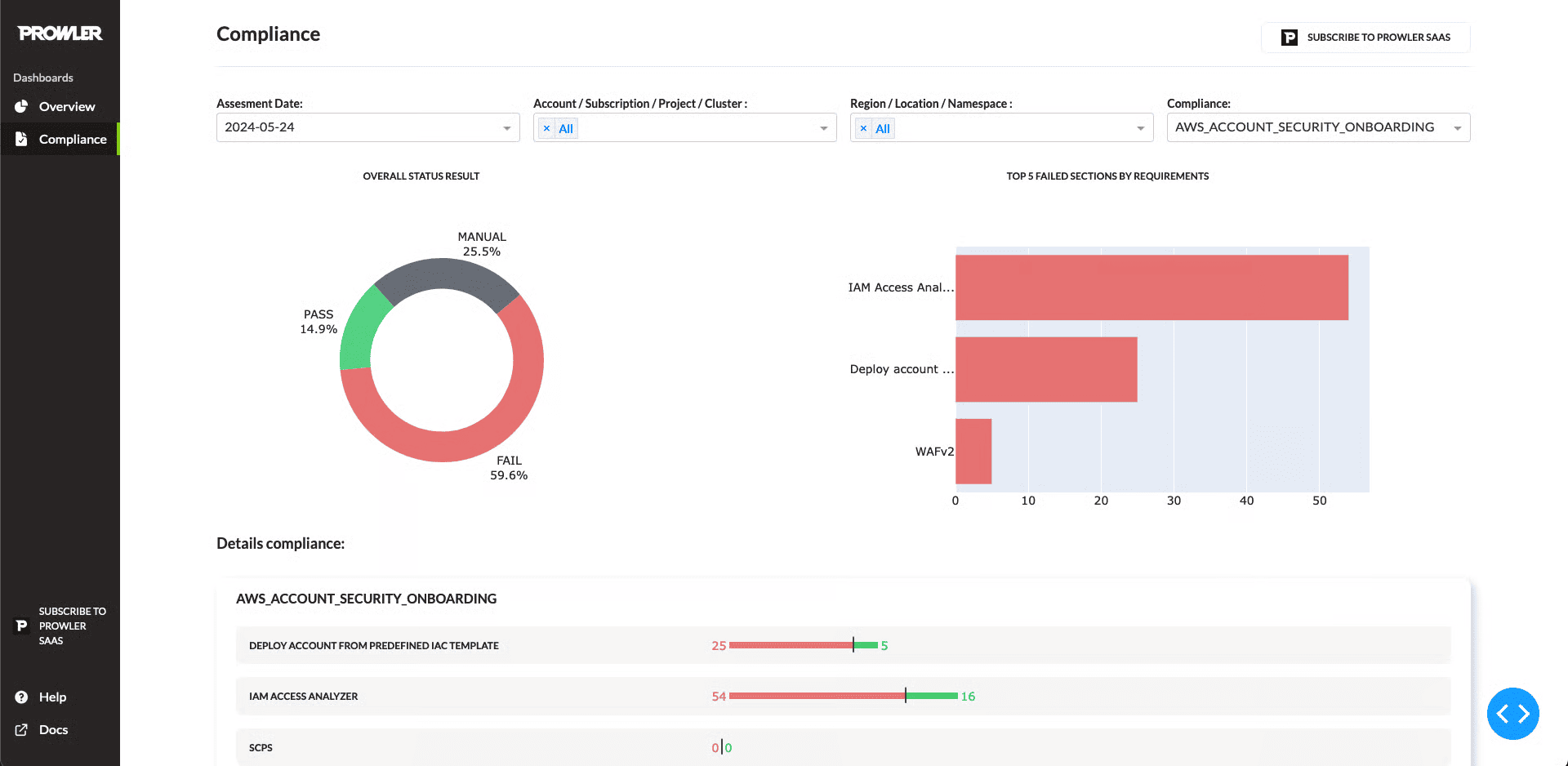
Prowler covers AWS, Azure, GCP, Kubernetes, GitHub, Microsoft 365, Google Workspace, Oracle, Alibaba, OpenStack, Cloudflare, IaC, and containers. VMware/VCF coverage is available through the Private Cloud offering.
The project offers 2,500+ security checks across 34 providers, mapped to 70+ compliance frameworks. Users call out AWS/Azure/GCP assessments, compliance coverage, and audit use cases.
Check before buying: CMDB sync, ITSM routing, ownership mapping, RBAC, and evidence export.
Features
- Open-source CLI-based scanner that can run from a developer workstation or automation pipeline
- Coverage across AWS, Azure, GCP, Kubernetes, and additional supported providers
- Framework mappings including CIS, NIST 800-53, PCI DSS, HIPAA, GDPR, FedRAMP, and MITRE ATT&CK
- Multiple output formats: JSON, CSV, HTML, OCSF for SIEM ingestion
- Active GitHub project with community contributions and regular releases
- Prowler Cloud adds dashboards, scheduling, and multi-account management
- Lighthouse AI provides AI-assisted security investigation and analysis of findings
- Prowler MCP Server makes security assessment context accessible through compatible clients, including Claude Code, Cursor, and VS Code
- Integrations with AWS Security Hub, Slack, and Jira, depending on deployment and offering
Pricing
Prowler Open Source is free under Apache-2.0 and includes the CLI, SDK, Local Server, 2,500+ checks, and public frameworks. According to the Prowler pricing page, Prowler Cloud bills per cloud account:
- Annual billing: $79/account/month
- Monthly billing: $99/account/month
- Resource capacity: 50,000 resources pooled across the tenant
- Trial: Seven days, no credit card required, no cloud-account limit
- Private Cloud: Quote-based deployment in the customer's environment, including air-gapped environments
A billable cloud account can be an AWS account, Azure subscription, Google Cloud project, GitHub repository, or Microsoft 365 tenant.
Environments above the pooled resource capacity or with 200+ accounts require a sales conversation. Prowler no longer publishes separate per-resource overage rates. Private Cloud has no resource cap and includes the Prowler Cloud capabilities except Realtime.
Ten accounts on annual billing come to $790 a month, or $9,480 a year. For teams comparing security tools for cloud computing, count every billable account first. The open-source scanner has no license fee, but someone still owns scheduling, normalization, remediation routing, evidence, and exception handling.
Pros and cons
✅ Replaces manual compliance spreadsheets: "Before using Prowler, we were spending hours of our engineers' efforts on compliance and misconfiguration checks, saving that configuration in Excel sheets, and after switching to Prowler, these processes are super smooth and easy, and we are currently saving our engineers' time." (PeerSpot)
✅ Surfaces AWS plaintext-secret risks: "I use Prowler to identify AWS infrastructure vulnerabilities, like plaintext secrets, which greatly improved our compliance." (PeerSpot)
✅ Agentless cloud audits save engineer time: "I use Prowler for agentless cloud compliance and security audits, saving significant engineer time. Its setup is smooth." (PeerSpot)
⚠️ Limited PDF reporting: "For the reports, Prowler does not provide PDF reports for all compliance standards; it only provides reports for the Prowler configuration." (PeerSpot)
⚠️ Severity miscategorization: "Some of the findings in Prowler are not that critical but come in the critical category, so that could be improved." (PeerSpot)
⚠️ Reported limitations in auto-remediation: "I wish it provided PDF reports for all compliances and automatic remediation for identified misconfigurations." (PeerSpot)
To summarize: cloud security tools comparison table
This table compares the tools against the capabilities that matter most when buyers evaluate cloud security management tools: asset context, vulnerability risk, CSPM, runtime or SIEM coverage, IT compliance, and container/Kubernetes security.
✅ The capability is available within the product or its associated platform portfolio. Additional licenses may be required.
⚠️ Partial coverage, module-dependent coverage, or coverage that usually needs another system to become operational.
❌ The capability is not offered natively within the evaluated product scope.
Searches for top-rated container security tools cloud often focus only on runtime and image scanning. This table keeps the bigger buying picture in view.
| Tool | CMDB / asset context | Vulnerability risk | CSPM | SIEM / runtime detection | IT compliance | Container / K8s security |
|---|---|---|---|---|---|---|
| Cloudaware | ✅ | ✅ | ✅ | ✅ | ✅ | ✅ |
| Wiz | ⚠️ | ✅ | ✅ | ⚠️ | ✅ | ✅ |
| Palo Alto Cortex Cloud | ⚠️ | ✅ | ✅ | ✅ | ✅ | ✅ |
| CrowdStrike Falcon Cloud Security | ⚠️ | ✅ | ✅ | ✅ | ⚠️ | ✅ |
| Microsoft Defender for Cloud | ⚠️ | ✅ | ✅ | ✅ | ✅ | ✅ |
| Tenable Cloud Security | ⚠️ | ✅ | ✅ | ⚠️ | ✅ | ⚠️ |
| Sysdig Secure | ❌ | ✅ | ✅ | ✅ | ⚠️ | ✅ |
| Orca Security | ⚠️ | ✅ | ✅ | ⚠️ | ✅ | ✅ |
| Snyk | ❌ | ✅ | ⚠️ | ❌ | ⚠️ | ✅ |
| Prowler | ❌ | ⚠️ | ✅ | ❌ | ✅ | ⚠️ |
Container and Kubernetes coverage does not necessarily mean live runtime protection. Snyk focuses on images, code, and configurations; Prowler primarily addresses posture and assessment; Sysdig and workload protection platforms address runtime behavior.
Similarly, SIEM integrations, native SIEM capabilities, and workload detection are different capabilities. Verify the required product modules before treating the table as a procurement specification.
Read also: 5 Hybrid Cloud Security Best Practices for 2026
How to run a cloud security proof of value
A feature checklist is easy to win in a demo. A shared test is harder to game. Give every shortlisted vendor the same small, representative environment and seven pieces of work.
Inventory test
Connect representative cloud accounts and compare discovered assets with provider-native inventory. Record missing, duplicate, and unsupported resources
Risk-context test
Seed or select one misconfiguration, one vulnerable workload, one excessive permission, and one exposed data path. Check which signals the platform correlates and which remain separate
Ownership test
Require application, environment, owner, and business criticality on the finding. Watch what happens when ownership is missing or disputed
Remediation test
Route work into the team's real system, change the status there, and confirm whether state, exceptions, evidence, and closure synchronize back
Attack-chain test
Use an authorized test environment and a representative attack simulation. Measure the time from the first signal to a finished investigation that identifies the asset owner, business impact, and next response step
Economics test
Price the connected environment for 12 months, including modules, agents, data, retention, support, implementation, and the staff needed to operate the tool
Exit test
Export findings, history, evidence, policies, and ownership data. A security platform should not become the next system your team cannot leave
How to choose the right cloud security tool for your environment
You've seen the ten options. Now comes the annoying part: picking one that fits your infrastructure, not somebody else's magic quadrant.
Most cloud security management tools look impressive in isolation. The real test is simpler: can the tool tell you what exists, what is exposed, who owns it, why it matters, and what needs to happen next?
Use four decision angles:
1. Environment shape. Running mostly AWS with fast-moving cloud teams? Start with Wiz or Orca for CNAPP coverage, Snyk for the dev pipeline, and Cloudaware as the CMDB join layer.
Running Azure-first with Microsoft already everywhere? Defender for Cloud gives native Azure signal depth. Add Cloudaware when AWS, GCP, SaaS, on-prem, owners, services, and compliance evidence need one asset model. CrowdStrike makes sense if your SOC already lives in Falcon.
For regulated estates with data centers still alive, prioritize hybrid cloud security tools that understand cloud and on-prem together. Cloudaware can sit as the primary context and governance platform; Tenable adds vulnerability exposure depth; Cortex Cloud or Defender can cover cloud-specific workload protection.
2. Risk job. If your top problem is posture, choose CSPM depth. If vulnerability noise is killing triage, prioritize risk correlation: CVE, exposure, exploit signal, business service, owner, ticket. If containers run production, Sysdig Secure belongs in the mix for runtime. Wiz or Orca can add attack-path context. If attackers adapt faster than your rules update, add behavioral detection. NeoSec baselines monitored assets and investigates deviations beyond known signatures.
3. Operating model. Developer-led org? Snyk should be early in the stack, especially if teams already use CI/CD security tools for cloud workflows. Pair it with Sysdig for runtime and Cloudaware for centralized visibility after code becomes infrastructure.
SOC-led org? CrowdStrike, Defender, Cortex Cloud, or Sysdig will feel more natural because alerts, detections, and response workflows matter as much as posture.
Small SOC, or no 24/7 coverage? NeoSec's AI agent builds the timeline, adds business impact from the CMDB, and prepares a response for the team's approval workflow.
4. Scale and governance. For cloud security tools for large organizations, check CMDB integration, ownership mapping, compliance evidence, Jira or ServiceNow sync, exception handling, RBAC, and audit history. These boring features decide whether findings get fixed or just admired in dashboards.
Budget-constrained and audit-driven? Start with Prowler, native cloud-provider tools, Snyk Free, and a Cloudaware free trial. Cheap can work, as long as someone owns the glue.